
Old Enlgish Handwritting OCR
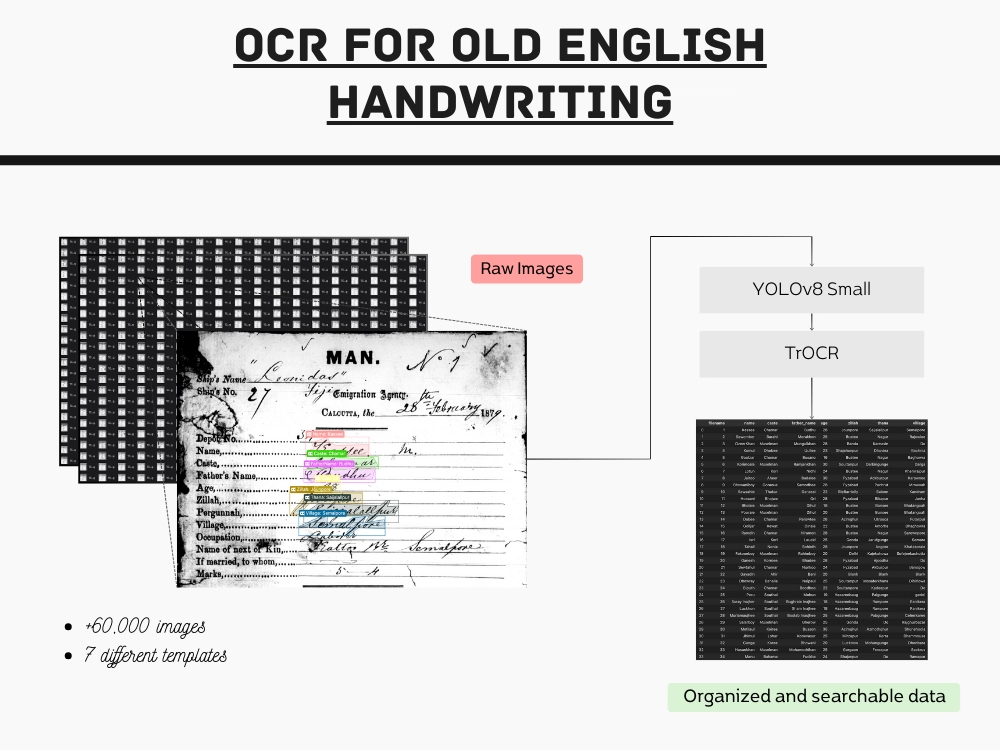
I developed a solution to extract text from historical emigrant passes, written in old English handwriting, achieving an accuracy of 94%.
Context
Between 1860 and 1920, Indians were transported to Fiji as indentured laborers. Each individual was issued a pass containing crucial information: their name, their father's name, their place of origin in India, and others. There are 60,529 emigrant passes, preserved as images, now require transcription into a comprehensive .csv file, capturing this significant historical data in a more accessible format.
My Role
As a freelance project, I took charge of labeling all the necessary images, selecting appropriate models, and fine-tuning them for optimal performance.
Problem
The handwriting on these emigrant passes is extremely difficult to decipher. Manual transcription would require specialized personnel, resulting in significantly higher costs.
Data
Data Analysis
Given the unique handwriting style in these documents and the substantial volume of images, I focused exclusively on the sample images provided by the employer for this project.
There are 3 keypoints that needs to be understand about this data:
- Templates: The documents appear in seven distinct template variations.
- Transcribed Data: The employer had transcribed only 25% of the total images into a CSV file.
- Fields of information: Seven specific fields need to be extracted from each document.
Labelling the data
For labeling the images, I opted to use Label Studio software. This tool allowed me to simply mark the selected text and input the transcribed information in COCO format, which could later be used for model training.

Models
To tackle this challenge, I initially explored pre-built solutions. However, due to the complexity of the handwriting, these proved inadequate. Consequently, I opted for an alternative approach, dividing the problem into two main tasks: detecting the text fields and applying OCR to the detected regions.
Object Detection
For this task, I opted for the well-known Ultralytics library. While it offers limited customization options, it proved efficient for this project with minimal overhead, thanks to its pre-built YOLO models.
I decided to use the YOLOv8 model, starting with the most basic version to evaluate its performance. The small model achieved impressive accuracy across all template variations, eliminating the need for a larger, more complex model.
OCR Model
For the OCR model, I selected a transformer-based approach, as simpler solutions proved inadequate. I opted for the well-known TrOCR model, which has been pre-trained on open-source datasets, allowing for a more efficient fine-tuning process.
Initially, the accuracy fell short of expectations, necessitating the labeling of additional images. I repeated this cycle of fine-tuning and evaluation until the agreed-upon performance criteria were met.
Outcomes
94%
Accuracy of the OCR model
98%
Accuracy of the object detection model